Legacy PHP Migration: How to Move from PHP 7 to PHP 8 Safely
Published by: Gautham Krishna RNov 02, 2026Blog
Legacy PHP applications have a way of outlasting the assumptions they were built on. They keep processing orders, authenticating users, and integrating with payment gateways long after the runtime version they depend on has stopped receiving security patches. For many businesses, the application still works, so the migration gets deferred -- until a dependency can no longer be updated, a framework drops support, or a routine server upgrade exposes how deeply the codebase is tied to PHP 7.
Moving from PHP 7 to PHP 8 is not a server configuration change. It is a compatibility engineering project that touches code, dependencies, frameworks, extensions, integrations, and deployment environments. The businesses that migrate safely are the ones that treat it as a planned engineering activity with assessment, sequencing, testing, and rollback preparation -- not as a version flag to flip and hope for the best.
Where that structured work is needed -- application assessment, compatibility evaluation, migration planning, code remediation, dependency updates, testing, and deployment support -- Evalogical's legacy PHP migration and modernization services can help teams move from an unsupported runtime to a maintained one while protecting the business functionality that depends on it. The sections below outline what that migration involves so that CTOs, IT managers, and technical decision-makers can evaluate their readiness and plan accordingly.
Why Businesses Are Moving from PHP 7 to PHP 8
The PHP project supports each release branch for two years of active support followed by two years of security-only fixes. After four years, the branch reaches end of life and receives no further patches [citation:6]. PHP 7.4 reached end of life on 28 November 2022 PHP 8.0 followed on 26 November 2023, and PHP 8.1 on 31 December 2025
The current supported landscape is narrower than many teams assume. As of late 2026, PHP 8.2 and 8.3 are in security-only maintenance, PHP 8.4 is in active support until 31 December 2026 with security support until 31 December 2028, and PHP 8.5 is in active support with security support until 31 December 2029. PHP 8.4 is not the only current option, but it provides a well-supported target with a documented migration path from PHP 7.4 and a security window extending into 2028.
The business case for moving is cumulative. Unsupported runtimes no longer receive fixes for newly reported vulnerabilities. Frameworks and Composer packages increasingly declare minimum PHP 8 requirements, narrowing the pool of maintainable dependencies. And the longer a PHP 7 application stays in production, the more technical debt accumulates -- debt that Deloitte's 2026 analysis estimates at 21% to 40% of organizational IT spending.
What Makes Legacy PHP Migration Challenging?
PHP 8 introduced a series of backward-incompatible changes. Some are syntactic, some are behavioural, and some only surface at runtime. The string-to-number comparison change in PHP 8.0 is a good example: 0 == "not-a-number" now evaluates to false, whereas it evaluated to true in PHP 7. Code that relied on loose comparison for input validation can silently change behaviour. PHP 8.0 also removed create_function() and each(), and made match and mixed reserved keywords. PHP 8.4 deprecated implicitly nullable parameters, meaning a parameter typed as Type $param = null must now be written as ?Type $param = null.
These changes are not uniformly disruptive. A small, well-maintained application may encounter only a handful of issues. A decade-old custom platform may encounter hundreds. The actual impact depends on the codebase, its dependencies, and how much of it was written using patterns that PHP 8 changed or removed.
Framework and Dependency Compatibility
Frameworks and Composer packages have their own PHP support constraints. A framework version that was current when the application was built may not support PHP 8.4, requiring a framework upgrade before the PHP upgrade can proceed. Composer packages pinned to ^7.4 or <8.0 will block installation under PHP 8.4 until they are updated or replaced. Transitive dependencies matter as much as direct requirements, and abandoned packages with no PHP 8-compatible release can become the longest single item in a migration plan.
Database and Third-Party Integrations
Database drivers, payment gateways, authentication providers, and external APIs all have their own compatibility assumptions. A payment gateway SDK that was last updated for PHP 7 may not install under PHP 8.4. A database driver may have changed behaviour between PHP versions. Integration testing is where these issues surface, and they are easy to overlook if the migration plan focuses only on application code.
Application Architecture and Technical Debt
Tightly coupled code, outdated architectural patterns, and undocumented functionality complicate migration. Code that works only because of implicit behaviour -- reliance on loose comparison, dynamic properties, or removed functions -- is exactly the code most likely to break under PHP 8. Migration exposes assumptions that were never written down.
Downtime carries measurable cost. New Relic's 2025 Observability Forecast found that high-impact outages carry a median cost of $2 million per hour, or roughly $33,333 per minute. Not every migration incident rises to that level, but the figure illustrates why migration planning must include staging, phased deployment, and a tested rollback path rather than a single cutover.
PHP Migration vs. PHP Upgrade vs. Application Modernization
The terms are often used interchangeably, but they describe different scopes of work.
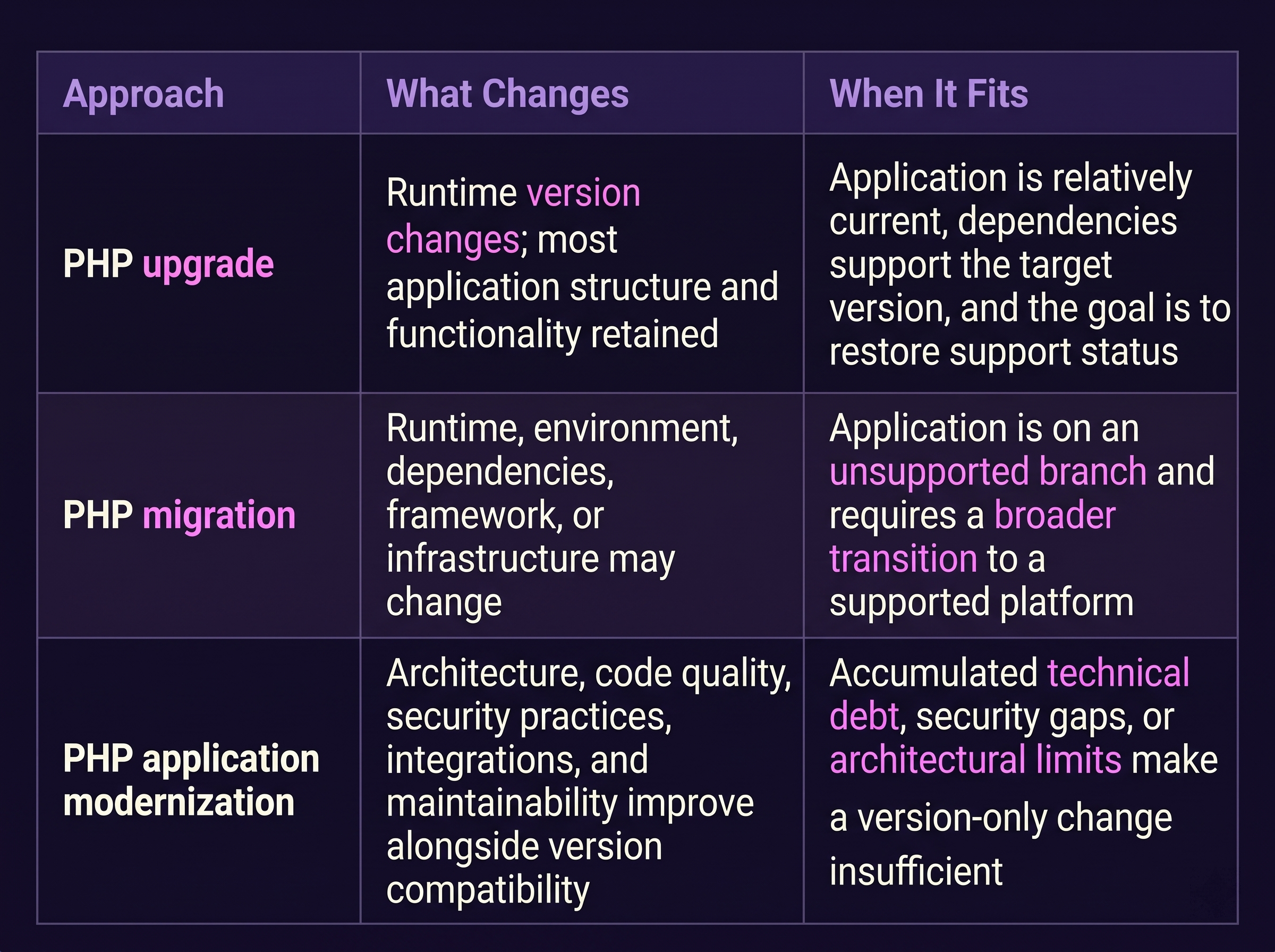
How to Migrate a Legacy PHP Application Safely
Step 1 - Assess the Existing Application
Establish a factual baseline before changing anything. Record the current PHP version, framework and CMS versions, Composer dependency inventory, installed PHP extensions, database environment, external integrations, and existing test coverage. The assessment output becomes the scope document for the migration. Without it, effort estimates are guesses.
Step 2 - Evaluate Compatibility and Migration Readiness
Use static compatibility scanning to identify removed functions, deprecated syntax, and signature incompatibilities against the target PHP version. Review each dependency's declared PHP support range. Identify framework versions that support PHP 8.4 and any that require a prior framework upgrade. Determine whether required PHP extensions have PHP 8.4 builds.
Step 3 - Define the Migration Strategy
Decide whether the project requires a direct runtime upgrade, an incremental migration through intermediate PHP versions, framework and dependency updates, selected application refactoring, or broader modernization. PHP's own upgrade guidance recommends moving one version at a time - 8.1 > 8.2 > 8.3 > 8.4 - because skipping versions makes it harder to isolate breakage. For applications coming from PHP 7.4, the strategy should account for changes introduced across 8.0 through 8.4 rather than treating 8.4 as a single transition.
Step 4 - Prepare the Migration Environment
Create a staging environment that mirrors production with the target PHP version, the same extensions, database driver, and web server configuration. Ensure full backups exist, version control is clean, and a rollback path to the PHP 7 environment is documented. Configuration management should allow the PHP version to be switched without manual server changes.
Step 5 - Update Code and Dependencies
Address compatibility issues identified in scanning and runtime testing. Fix removed functions and fatal errors before deprecation notices. Update Composer dependencies to PHP 8.4-compatible versions, resolving conflicts one at a time so regressions can be attributed to specific packages. Update or rebuild PHP extensions. Where an extension has no PHP 8.4 build, evaluate replacement options.
Step 6 - Perform Comprehensive Testing
Testing should cover functional, regression, API and integration, database, security, performance, and user acceptance testing. Focus on areas affected by behavioural changes: loose comparisons, error handling, nullable parameters, and any code that relied on removed functionality. An application starting successfully under PHP 8 does not prove that the migration is complete. Startup validates that the runtime loads; testing validates that the business logic still behaves correctly.
Step 7 - Deploy and Monitor
Use a staged rollout where possible. Deploy to a subset of servers, monitor error logs and application performance, then expand. Keep the PHP 7 environment available for rollback until the new deployment has been stable for a defined observation period. Monitor deprecation notices, error rates, response times, and integration health after release.
Common PHP Migration Mistakes Businesses Should Avoid
Upgrading PHP without assessing the codebase. A runtime change without compatibility scanning is a production experiment. Static scanning and staging validation are prerequisites, not optional steps.
Ignoring framework and dependency compatibility. A framework that does not support PHP 8.4 will fail regardless of application code quality. Dependency and framework readiness must be confirmed before the runtime cutover.
Skipping regression testing. Successful startup is not evidence of correct behaviour. Regression testing is where behavioural changes surface.
Overlooking third-party integrations. Payment gateways, authentication providers, and external APIs can break independently of application code. Integration testing must be included in the migration scope.
Making large changes without backups or rollback plans. A migration without a tested rollback path converts a recoverable incident into an outage.
Ignoring application security. PHP 8 compatibility does not fix SQL injection, XSS, or insecure authentication. Security remediation should be considered alongside migration, even if it is scoped separately.
Treating migration as only an infrastructure task. Migration touches code, dependencies, configuration, and testing. An infrastructure-only view underestimates the work.
Failing to plan post-migration maintenance. Migration is a milestone, not an endpoint. Dependencies continue to age, and the application needs an ongoing patch and upgrade rhythm.
When Should You Consider Professional PHP Migration Services?
External expertise may be valuable when the application has a large or complex legacy codebase, when internal developers lack PHP 8 compatibility experience, when the application supports critical business operations, when multiple integrations and dependencies are involved, or when the organization needs a controlled migration with minimal disruption.
A migration partner should be expected to provide an initial application assessment, a migration roadmap, compatibility analysis, code and dependency remediation, testing and quality assurance, deployment planning, and post-migration support where offered. The engagement should start with assessment, not with a fixed quote based on assumptions.
How to Choose the Right PHP Migration Partner
Evaluate a PHP migration company on technical capability and project approach, not price alone. Relevant criteria include experience with legacy PHP applications, understanding of PHP 7-to-8 compatibility, framework and dependency knowledge, application security expertise, testing and quality assurance processes, experience with databases and integrations, deployment and rollback planning, communication and project transparency, and ongoing support capabilities.
A partner that treats migration as a version-flag change is not equipped for a legacy environment. The right partner will want to assess before quoting, will distinguish runtime upgrades from application-level remediation, and will plan testing and rollback as part of the engagement.
Final Thoughts
Safe PHP migration requires planning, compatibility evaluation, testing, and controlled deployment. The businesses that migrate successfully are the ones that assess the condition of their application before deciding whether they need a simple upgrade, a broader migration, or a modernization initiative -- and then sequence the work so that compatibility issues are resolved before production cutover, not after.
If your organization is running a legacy PHP application on an unsupported branch and needs to understand the migration path, Evalogical's PHP migration and application modernization capabilities can support assessment, planning, compatibility remediation, testing, and deployment.
Frequently Asked Questions
Q: What are legacy PHP migration services?
A: Legacy PHP migration services help organizations move applications running on unsupported or aging PHP versions to a supported runtime. They typically include application assessment, compatibility analysis, dependency and framework evaluation, code remediation, testing, and deployment support. The scope may be a runtime upgrade, a broader migration, or a modernization initiative depending on the application's condition.
Q: How do I migrate a PHP 7 application to PHP 8?
A: Start with an assessment of the codebase, framework, dependencies, extensions, and integrations. Run static compatibility scanning against the target PHP version, update dependencies and framework versions as required, prepare a staging environment, fix compatibility issues, test comprehensively, and deploy in a controlled rollout with a rollback plan. The migration is not complete until functional, regression, integration, and security testing have validated the application's behaviour.
Q: Can a legacy PHP application be migrated without rewriting it?
A: In many cases, yes. A runtime upgrade or migration can retain most of the existing application structure, with targeted code changes for removed functions, deprecated syntax, and behavioural changes. A full rewrite is not automatically required. The appropriate approach depends on code quality, dependency health, framework constraints, and how much of the application relies on behaviour that PHP 8 changed.
Q: What are the biggest challenges in PHP 7 to PHP 8 migration?
A: The most common challenges are removed functions and syntax changes in PHP 8.0, changed string-to-number comparison behaviour, dependencies with no PHP 8-compatible release, framework versions that require a prior upgrade, PHP extensions without target-version builds, and low test coverage that makes regressions hard to detect. Integration compatibility and database driver behaviour are also frequent sources of issues.
Q: How long does a PHP application migration take?
A: There is no fixed timeline. Duration depends on application size, codebase quality, dependency count, framework constraints, integration requirements, test coverage, and the number of incompatible extensions or legacy code paths. An initial assessment is the appropriate way to estimate effort for a specific application.
Q: When should a business hire a PHP migration company?
A: Consider external expertise when the application is large or complex, when internal teams lack PHP 8 compatibility experience, when the application supports critical operations, when multiple integrations and dependencies are involved, or when the business needs a controlled migration with minimal disruption. A partner should assess before quoting and should distinguish runtime upgrades from application-level remediation.
Q: What is the difference between PHP migration and PHP modernization?
A: A PHP migration moves an application to a supported PHP version or environment, potentially changing dependencies, frameworks, or infrastructure. PHP modernization goes further and addresses architecture, code quality, security practices, integrations, and maintainability beyond version compatibility. Migration restores support status; modernization improves the application's long-term condition.
Q: How can businesses reduce downtime during PHP migration?
A: Use a staging environment that mirrors production, run comprehensive testing before cutover, deploy in stages where possible, monitor error logs and performance after release, and maintain a tested rollback path to the previous environment. Staged rollout and rollback readiness reduce the impact of unforeseen issues, though they do not eliminate migration risk entirely.


 PHP Security Vulnerabilities: ....
 How to Upgrade PHP 7.4 to PHP ....
 Creatio No-Code Platform: What....
 CRM Migration: Why Process Red....
 Is Salesforce to Creatio Migra....



Your Trusted Software Development Company