What Is Creatio CRM? A Practical Guide for Business and IT Leaders
Published by: Gautham Krishna ROct 13, 2026Blog
Before diving into Creatio, let's clarify what CRM actually means. Customer Relationship Management is a category of software that helps organizations manage interactions with customers, track sales opportunities, handle service requests, and coordinate marketing efforts. At its core, a CRM answers three questions: Who are our customers? What have we done with them? What should we do next?
Traditional CRM systems were essentially digital filing cabinets. They stored contact information, logged calls, and tracked deals. Over time, they evolved to include automation, analytics, and integrations with other business systems. But most still followed the same fundamental model: a database of customer records with a user interface on top.
Creatio approaches CRM differently. Instead of treating customer data as the center of gravity, it treats business processes as the center. Customer records matter, but they matter because they feed into workflows -- lead qualification, service resolution, campaign execution, approval chains. Creatio combines CRM functionality with a platform for building and automating those workflows, using visual designers that business users can operate without writing code.
This distinction matters for how you evaluate the platform. If you need a system of record for customer data, many CRMs will do the job. If you need a platform that can orchestrate complex, cross-departmental processes and embed AI agents into those processes, the evaluation criteria change.
Creatio is an AI-native CRM and workflow platform. That phrasing comes from Creatio's own product positioning, and it's worth unpacking. "AI-native" means artificial intelligence is embedded across the platform rather than added as a separate module. "Workflow platform" means the system is designed to automate processes -- not just store data. According to Creatio's official documentation, the platform helps organizations "manage end-to-end customer relationships and automate processes across marketing, sales, and customer service" .
The platform is built on Creatio Business & AI Studio, which provides the no-code designers, workflow automation engine, and AI agent lifecycle management tools that sit underneath the CRM applications . This architectural choice is important: it means the CRM applications (Sales, Marketing, Service) are not separate products bolted onto a database. They are pre-built applications running on the same platform, which means customization and automation extend across all of them consistently.
Creatio is used by midsize organizations and enterprises across more than 20 industries, including banking, credit unions, manufacturing, public service, and telecommunications . The platform serves thousands of customers in over 100 countries and automates tens of millions of workflows daily .
How Creatio Differs From Traditional CRM Systems
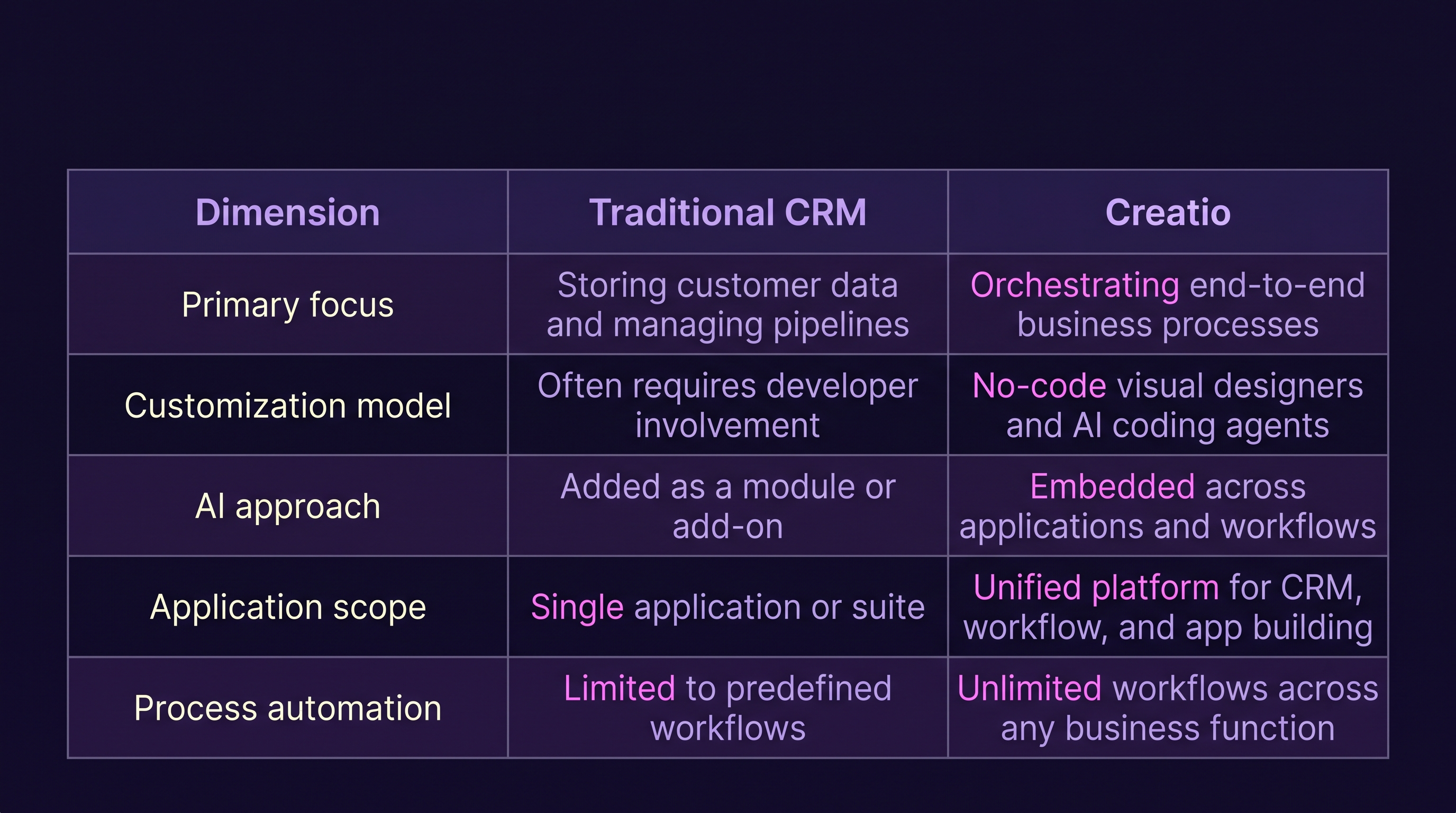
The practical implication is that Creatio is designed for organizations that want to digitize and automate processes that extend beyond traditional CRM boundaries -- onboarding, procurement, compliance approvals, internal service requests, and industry-specific workflows.
Creatio's CRM suite includes three primary applications, each available as a standalone product or as part of the platform. As of 2026, Creatio Sales, Creatio Marketing, and Creatio Service are each available from AUD 21 per user per month, with the core platform starting at AUD 55 per user per month .
Creatio Sales
Creatio Sales provides end-to-end automation for sales processes. It includes lead management, opportunity management, sales forecasting, and pipeline tracking. Customer 360 provides a unified view of customer interactions and data . The application supports field sales management, document flow automation, and project management .
With the 10x release launched in July 2026, sales capabilities expanded to include AI-assisted sequences, guided selling, enhanced forecasting, revenue intelligence, and voice agents for field sales teams .
Creatio Marketing
Creatio Marketing automates marketing campaigns and lead management workflows. It includes multi-channel campaign management, email marketing, segmentation, website behavior tracking, and lead scoring . Marketing agents can create audience segments and assets such as landing pages, emails, and forms while coordinating campaigns .
The application provides a 360-degree customer view with intelligent data enrichment, trigger campaigns, and event management .
Creatio Service
Creatio Service handles customer service, case management, and service processes. It supports omni-channel service delivery, knowledge management, and service level agreement tracking. The platform can automate customer inquiry classification and routing using AI . Service workflows can be configured to handle case escalation, resolution tracking, and customer communication across channels.
No-Code Configuration and Business Process Automation
The defining characteristic of Creatio is its no-code approach to configuration and automation. Gartner Peer Insights reviewers describe Creatio Studio as "a blank slate for business process/workflow building" where "the no-code designer's drag and drop UI makes it super easy for anyone to design workflows for marketing, sales, case record management or to interface with other integrations" .
This doesn't mean coding is never required. Creatio supports customization via scripts for organizations that need to extend beyond visual configuration . The distinction is that common configuration tasks -- adding fields, building approval chains, designing forms, creating automated notifications -- can be handled by business analysts and operations teams rather than developers.
For organizations evaluating the platform, the practical question is: how much of your customization requirement falls within no-code capabilities, and how much will require development? The answer depends on your specific processes and how far they deviate from out-of-the-box functionality.
AI Capabilities: Native, Not Bolted On
Creatio's AI strategy centers on what the company calls an "agentic" platform. The 10x release, launched in July 2026, introduced several new AI capabilities including Agent No-Code Designers, a Prompt Agent Designer for building agents with natural language, and a Workflow Agent Designer for multi-step deterministic agents built with visual tools . The platform also introduced AI Twin, a conversational development interface that lets employees create personal AI agents without writing code .
Creatio AI Studio manages the end-to-end agent lifecycle, including governance, observability, and policy enforcement . The platform supports GPT-5.2 model integration for configuring AI agents and sub-agents . In September 2026, Creatio announced a $300 million investment to expand its Bank.AI platform for financial institutions, continuing to enhance AI Studio with capabilities for no-code AI agent development, governance, integrations, security, and enterprise-grade observability .
These are vendor-reported capabilities. Organizations should test AI features against their own data, workflows, and governance requirements rather than relying on product demonstrations or marketing materials.
Integrations and APIs
Creatio provides OData REST API access and webhook connections for integrating with external systems . The Growth plan includes 10,000 API calls per user per day, while Enterprise and Unlimited plans provide unlimited API access . The platform connects with common enterprise systems including ERP, marketing automation tools, data warehouses, and custom applications.
The integration evaluation should focus on your specific technology stack. Creatio offers connectors and APIs, but complex integrations -- particularly with legacy systems or industry-specific applications -- may require custom development work.
Customization, Scalability, Security, and Governance
Creatio supports customization through no-code designers, scripts, and custom code. The platform scales across Growth, Enterprise, and Unlimited plans. The Unlimited plan, effective from May 2026, removes limits on users, custom agents, applications, workflows, custom objects, and API calls .
Security features include single sign-on, LDAP synchronization, granular access controls with column and field-level permissions, audit logging, and change tracking . The platform offers SOC 2 Type II and HIPAA compliance . Hosting options include cloud and on-premise deployment .
Governance capabilities include application-level governance available at $50 per user per month for Growth and Enterprise plans, and included in the Unlimited plan . AI governance features provide policy enforcement, auditing, and visibility into agent decisions .
Common Business Use Cases and Industry Scenarios
Financial Services
A bank needs to automate loan application processing across multiple departments -- credit assessment, compliance review, and final approval. Creatio can orchestrate this workflow, routing applications based on predefined rules, triggering notifications at each stage, and maintaining an audit trail for regulatory purposes. The Bank.AI platform specifically targets banking workflows .
Insurance
An insurance company wants to streamline claims processing. Creatio can automate intake, route claims to adjusters based on complexity, track service level agreements, and provide customers with status updates through multiple channels.
Manufacturing
A manufacturer needs to manage dealer networks, track orders, and coordinate after-sales service. Creatio can unify dealer management, order tracking, and service request handling on a single platform, with workflows that connect sales, operations, and support teams.
Professional Services
A consulting firm wants to automate client onboarding, project initiation, and resource allocation. Creatio can build workflows that connect CRM data with project management processes, ensuring that new engagements trigger the right internal steps automatically.
Customer Support
A telecommunications company needs to handle high volumes of service requests across phone, email, chat, and social media. Creatio Service can classify incoming requests using AI, route them to the appropriate team, and track resolution against service level agreements.
Implementation Considerations
Implementing Creatio involves several phases that organizations should plan for carefully.
Requirements gathering involves documenting business processes, identifying customization needs, and defining success criteria. This phase determines whether out-of-the-box functionality is sufficient or whether configuration and development work is required.
Configuration uses Creatio's no-code designers to set up applications, fields, forms, workflows, and user roles. Business analysts can typically handle this phase with support from technical resources for complex logic.
Integrations connect Creatio with existing systems -- ERP, marketing automation, data warehouses, and custom applications. Integration complexity varies based on the number of systems, data volume, and whether real-time synchronization is required.
Data migration involves extracting, transforming, and loading customer records and historical data from legacy systems. Data quality issues that existed in the source system will surface during migration.
Testing validates that workflows execute correctly, integrations function as expected, and user access controls work. Comprehensive testing should cover functional scenarios, edge cases, and performance under load.
Training and adoption ensure that users understand how to use the system and that business processes are adapted to the new platform. Adoption risk is real and should be managed actively with champions, training programs, and feedback loops.
Creatio's Nucleus Research-reported outcomes -- 70% faster implementation and 37% lower total cost of ownership -- are based on organizations that switched to the platform . These figures should be interpreted as observed outcomes for a specific population, not guaranteed results.
Benefits, Limitations, and Fit Considerations
Potential Benefits
- No-code configuration reduces dependency on specialized developers
- AI capabilities are embedded across applications rather than added as separate modules
- Unified platform for CRM, workflow automation, and application building
- Flexible pricing models including Unlimited for enterprise-wide deployment
- Supports complex, cross-departmental business process automation
Practical Considerations
- Complex integrations or industry-specific requirements may require custom development
- Data quality issues in source systems will need to be addressed during migration
- User adoption depends on training and change management, not just platform capabilities
- Governance and security configuration requires planning, especially for regulated industries
- The platform's breadth means implementation scope can expand if not carefully managed
When Creatio May Not Be the Right Fit
Organizations with highly specialized requirements that fall outside Creatio's supported workflows may find that a purpose-built solution or a different platform better fits their needs. Similarly, organizations with very simple CRM requirements -- basic contact management and deal tracking -- may find that a lighter-weight solution is more appropriate. Creatio's strength is in process automation and platform extensibility; if those capabilities aren't needed, the investment may not deliver proportionate value.
How Business and IT Leaders Can Evaluate Creatio
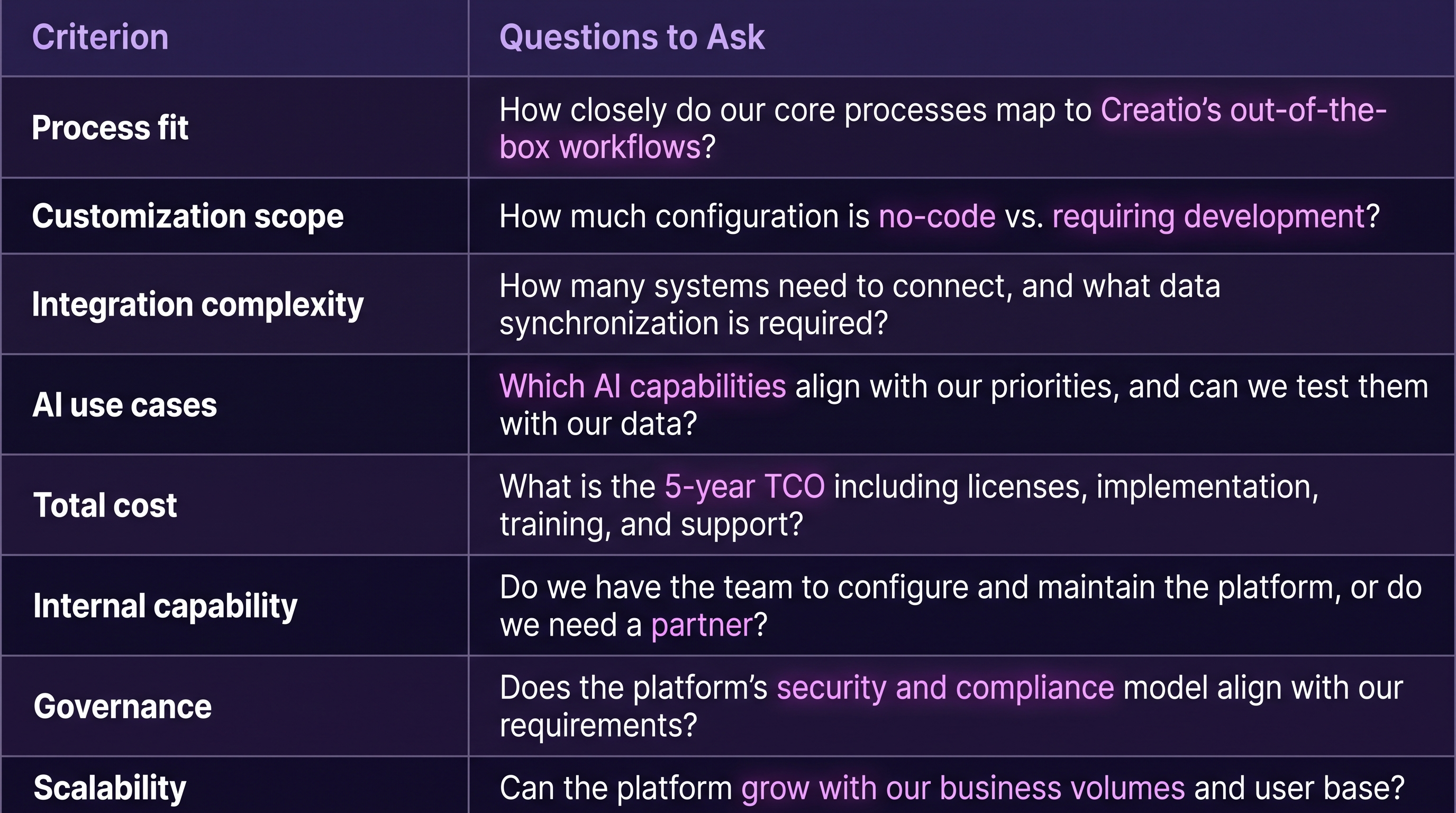
Before committing to implementation, consider these evaluation criteria:
Where Evalogical Fits In
Evaluating a platform is one thing. Implementing it successfully is another. Evalogical is a Creatio implementation partner with experience in CRM deployment, workflow automation, and enterprise integration. Their team can support requirements analysis, solution configuration, process automation, integrations, customization, testing, and implementation planning.
For organizations that need help assessing whether Creatio fits their requirements, Evalogical's CRM implementation and integration services provide a structured approach to evaluation and deployment. Their broader technology services support the full lifecycle of enterprise application development and digital transformation.
Frequently Asked Questions
Q: What is Creatio CRM used for?
A: Creatio CRM is used to manage customer relationships, automate sales and marketing processes, and handle customer service workflows. Unlike traditional CRM systems that focus primarily on storing customer data, Creatio combines CRM functionality with a workflow automation platform that lets organizations build and automate business processes across departments. It is used by organizations in banking, insurance, manufacturing, professional services, telecommunications, and customer support.
Q: What are the core applications in Creatio?
A: Creatio's core CRM applications are Creatio Sales (for sales automation, pipeline management, and forecasting), Creatio Marketing (for campaign management, lead generation, and customer engagement), and Creatio Service (for customer support, case management, and service workflows). Each application is available as a standalone product or as part of the broader platform, with pricing starting at AUD 21 per user per month for individual applications and AUD 55 per user per month for the core platform.
Q: How does Creatio's no-code capability work?
A: Creatio provides visual designers for building applications, workflows, forms, and user interfaces. Business users and analysts can configure these elements without writing code, using drag-and-drop interfaces and natural language prompts. For more complex requirements, Creatio supports customization via scripts and custom code. The platform's AI coding agents can also assist with development tasks, reducing the technical expertise required for common configuration work.
Q: How long does a Creatio implementation take?
A: Implementation timelines vary based on organization size, process complexity, integration requirements, and customization scope. Creatio's reported implementation timelines, based on Nucleus Research findings, suggest that organizations switching from legacy systems have achieved faster implementation compared to alternative platforms. However, complex multi-system integrations or heavily customized workflows may extend timelines. A structured implementation plan with clear phases and milestones is essential regardless of platform.
Q: Can Evalogical help us evaluate whether Creatio is right for our business?
A: Yes. Evalogical provides Creatio implementation and advisory services, including requirements analysis, solution design, and platform evaluation. Their team can help organizations assess whether Creatio fits their specific business processes, integration needs, and budget, and can support configuration, customization, testing, and deployment if the decision is made to proceed. The evaluation process starts with understanding your requirements, not with a product demonstration.
Book a Creatio Walkthrough
If you're exploring CRM platforms and want to understand how Creatio could support your business processes, the next step is a conversation -- not a sales pitch.
Evalogical offers a Creatio walkthrough session where you can discuss your requirements, see the platform in action, and evaluate whether it aligns with your organization's needs. Whether you're modernizing a legacy CRM, automating complex workflows, or exploring AI-assisted customer operations, the walkthrough is designed to help you make an informed decision.
Book a Creatio walkthrough with the Evalogical team and explore how Creatio could fit your business.



 Legacy PHP Migration: How to M....
 PHP Security Vulnerabilities: ....
 How to Upgrade PHP 7.4 to PHP ....
 Creatio No-Code Platform: What....
 CRM Migration: Why Process Red....


Your Trusted Software Development Company