Is Salesforce to Creatio Migration Worth It? A Decision Framework
Published by: Gautham Krishna ROct 26, 2026Blog
Salesforce renewals have a way of forcing uncomfortable questions. The contract is up for renewal, the user count has grown, the add-on list has multiplied, and someone in finance asks the obvious question: are we actually getting value from this platform, or are we paying for complexity we don't use?
That question often leads to Creatio. It's positioned as the AI-native, no-code alternative that promises faster implementation and lower total cost of ownership. Independent research from Nucleus Research found that organizations switching to Creatio achieved a 37% reduction in technology costs and a 70% reduction in implementation timelines . Creatio's own comparison materials cite these figures and note that implementations can typically be completed in 6-16 weeks, compared with six months or more for complex Salesforce deployments .
But here's the uncomfortable truth: those figures describe organizations that already switched. They don't tell you whether your organization should. Migration is a high-stakes platform decision, and the right answer is not always "move." Sometimes it's "optimize what you have." Sometimes it's "we don't know yet -- and that's the problem."
This guide is a decision framework, not a recommendation. Its purpose is to help you evaluate whether migrating from Salesforce to Creatio will deliver enough business value to justify the cost, complexity, and operational disruption -- or whether a different path makes more sense.
Why Businesses Reconsider Salesforce
Organizations evaluate alternatives to Salesforce for legitimate reasons. None of these reasons automatically mean Salesforce is unsuitable. They are signals worth investigating.
Rising or unpredictable total cost of ownership. Salesforce restructured its editions in September 2026. Core editions now cost $195 per user per month, Advanced editions $395, and Max editions $550, each bundling Agentforce AI credits into the subscription . These changes simplify purchasing but also raise the entry price for organizations that don't need the bundled AI capacity.
Underused licenses and platform complexity. Many Salesforce instances carry licenses for features that were purchased during expansion and never fully adopted. Marketing Cloud, Commerce Cloud, or Data Cloud may sit partially used while the core Sales Cloud does the heavy lifting.
Expensive customization and maintenance. Salesforce's extensibility is a strength, but it comes at a cost. Apex development, Lightning Web Components, and complex Flow logic require specialized skills. Organizations that rely on contractors or retainers for routine changes often feel the pain of this dependency.
Workflow automation requirements. Salesforce Flow is capable, but organizations with complex, cross-departmental business processes sometimes find that Flow's declarative limits push them toward code. Creatio's process designer is built for exactly this kind of process-heavy work .
Integration challenges. Every CRM sits at the center of an integration landscape. If Salesforce integrations with ERP, billing, or industry-specific systems are fragile or expensive to maintain, that friction becomes a reason to evaluate alternatives.
AI and enterprise automation requirements. Salesforce's Agentforce strategy is ambitious, but advanced AI functionality may require higher-tier subscriptions or consumption-based services. Creatio embeds AI natively across its platform, which may align better with organizations that want AI capabilities without additional product layers .
When Creatio May Be a Better Fit
Creatio is not a universal replacement for Salesforce. It is a different architectural bet. Creatio is built on a no-code platform (Creatio Business & AI Studio) with embedded AI, unified CRM applications (Sales, Marketing, Service), and a workflow automation engine that business users can operate directly . Salesforce is a broader ecosystem with deeper customization capabilities, a larger AppExchange marketplace, and more extensive enterprise reference architectures at the very top end.
Creatio may be a stronger fit when:
- Process complexity is high, but coding capacity is low. Organizations that need sophisticated workflow automation but don't have in-house Salesforce developers can build and modify processes in Creatio's visual designer.
- Time to value matters. Creatio's reported 6-16 week implementation timelines for standard deployments are faster than complex Salesforce implementations .
- Total cost of ownership is a primary constraint. The Nucleus-reported 37% TCO reduction for switchers is significant, though it should be validated against your specific license mix and integration requirements .
- AI needs to be embedded, not bolted on. Creatio's AI Studio and native AI capabilities across CRM applications may reduce the need for separate AI products or add-ons.
- The organization wants to reduce platform complexity. Consolidating multiple Salesforce clouds and AppExchange subscriptions into a single Creatio platform can simplify administration and vendor management.
A Practical Migration Decision Framework
The decision to migrate or stay should be based on evidence, not instinct. This framework proposes dimensions to investigate. It is an evaluation aid, not a validated scoring methodology. The goal is to surface missing information and align stakeholders on what matters.
Dimension 1: Business Objectives and Strategic Alignment
What to investigate: What business problems is the CRM supposed to solve over the next three to five years? Does Salesforce's roadmap align with those objectives, or does Creatio's no-code and AI-native direction fit better?
Warning signs: If the organization cannot articulate why it is considering migration beyond "cost," the evaluation is incomplete. Cost is a factor, not a strategy.
Dimension 2: Current Salesforce Costs and Expected Future Costs
What to investigate: Total cost of ownership over a three-to-five-year horizon. This includes licenses, add-ons, implementation, customization, integrations, administration, training, and support. The full TCO of Salesforce is often two to three times the license fee alone .
Warning signs: If the organization only compares per-user license prices, it is not comparing TCO.
Dimension 3: Actual License Utilization
What to investigate: Which licenses are actively used? Which features are paid for but dormant? How many users log in regularly, and which applications do they actually use?
Warning signs: If 30% or more of licenses are underutilized, the cost problem may be solvable through license optimization rather than migration.
Dimension 4: Custom Objects and Custom Development
What to investigate: How many custom objects exist? How much Apex code, Lightning Web Components, or complex Flow logic is in production? Who maintains it?
Warning signs: If custom development is deeply embedded and undocumented, migration risk increases substantially. Creatio can replicate many customizations through no-code configuration, but complex logic may still require development .
Dimension 5: Workflow and Automation Complexity
What to investigate: How many automated workflows exist? How complex are they? Do they span multiple departments or systems?
Warning signs: If workflows are simple and stable, migration risk is lower. If workflows are complex, deeply integrated, and poorly documented, migration planning must account for redesign and testing.
Dimension 6: Integration Dependencies
What to investigate: Which systems connect to Salesforce? What APIs, middleware, or point-to-point integrations are in use? Which integrations are business-critical?
Warning signs: Heavy integration landscapes increase migration cost and risk. Every integration must be rebuilt or reconnected in Creatio.
Dimension 7: Data Quality and Migration Complexity
What to investigate: How clean is the data? Are there duplicate records, incomplete fields, or inconsistent formats? What is the data volume?
Warning signs: Poor data quality doesn't prevent migration, but it adds cost and time. Data cleansing should be part of the migration budget, not an afterthought.
Dimension 8: Reporting and Analytics Requirements
What to investigate: What reports and dashboards are in use? Are they built natively in Salesforce, or do they rely on external tools like Tableau or Power BI?
Warning signs: If reporting is highly customized, rebuilding it in Creatio may require significant effort.
Dimension 9: Security, Permissions, and Governance
What to investigate: How complex is the role hierarchy? Are there field-level security requirements, sharing rules, or compliance constraints?
Warning signs: Complex security models increase migration complexity. Creatio supports granular access controls, but the configuration must be planned carefully.
Dimension 10: User Adoption and Training
What to investigate: How well do users adopt Salesforce? What is the training burden? How would a new interface affect productivity?
Warning signs: If users are already struggling with Salesforce, a new platform may not solve the underlying adoption problem. If users are productive and resistant to change, migration carries adoption risk.
Dimension 11: Customer Experience and Business Continuity
What to investigate: Which customer-facing processes depend on the CRM? How would a migration affect customer communications, service levels, or sales cycles?
Warning signs: Customer-facing migrations require phased approaches and contingency plans.
Dimension 12: Implementation Capacity and Internal Resources
What to investigate: Does the organization have the internal resources to manage a migration? Or will it rely entirely on a partner?
Warning signs: Migration projects fail when internal ownership is absent. A partner can execute, but the organization must govern.
Dimension 13: Expected Long-Term Business Value
What to investigate: What measurable outcomes would justify migration? Reduced administrative hours, faster process completion, improved adoption, lower maintenance costs, or better flexibility.
Warning signs: If the business case relies solely on license savings without accounting for migration costs and productivity dips, it is incomplete.
Three Possible Decisions
Option A: Stay with Salesforce and Optimize It
Staying is the right decision when Salesforce already meets business requirements, migration costs would be disproportionate, or the organization relies heavily on Salesforce-specific capabilities. This may include deep AppExchange dependencies, highly customized workflows that work well, or a multi-org architecture that would be difficult to replicate .
Optimization opportunities include license right-sizing, archiving unused custom objects, simplifying workflows, renegotiating contracts, and investing in user training to improve adoption.
Option B: Migrate from Salesforce to Creatio
Migration may be worth exploring when Creatio's capabilities align better with required business processes, automation needs, and long-term platform strategy. The strongest migration cases involve organizations that are process-heavy, frustrated by customization costs, and able to articulate a clear business case beyond license savings .
Migration timelines vary. Standard Creatio deployments can take 4-8 weeks, while Salesforce-to-Creatio migrations typically run three to twelve months depending on organizational size and complexity .
Option C: Delay the Decision and Conduct a Structured Assessment
Delay is a legitimate outcome when the organization lacks reliable cost data, has unresolved data-quality problems, does not understand its integration dependencies, or has not defined clear migration objectives. A structured assessment -- discovery workshops, data profiling, integration mapping, and stakeholder interviews -- can fill these gaps before a commitment is made.
The Real Cost of Migration
Migration costs extend far beyond subscription prices. A like-for-like TCO comparison over three to five years should account for both staying and migrating.
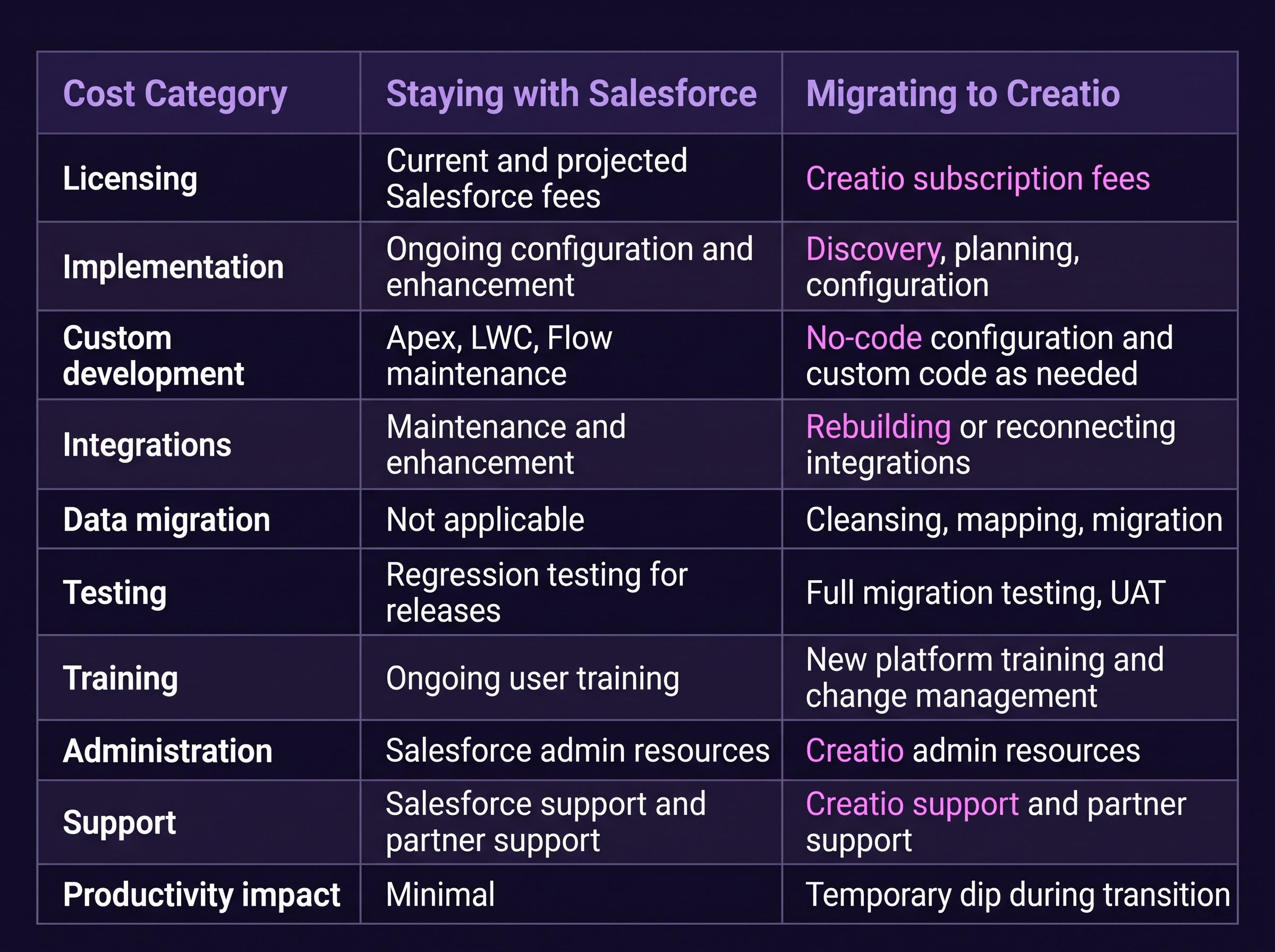
Creatio's pricing is composable. The core platform starts at AUD 55 per user per month, with CRM applications from AUD 21 per user per month each . An Unlimited plan removes limits on users, workflows, and API calls . These prices should be modeled against actual user counts and application requirements, not assumed to be universally lower than Salesforce.
Evaluating Expected Benefits and Business Value
Migration should be justified by measurable outcomes, not vague promises. Potential benefit areas include:
- Reduced manual work through no-code automation
- Shorter process completion times
- Improved CRM adoption through a simpler interface
- Reduced administrative effort for routine changes
- Better workflow visibility across departments
- Improved data quality through consolidation
- More efficient system maintenance with fewer specialized resources
The critical comparison is not "Creatio vs. Salesforce in the abstract" but "Creatio vs. an optimized Salesforce environment." If Salesforce can be optimized to deliver similar benefits at lower cost and risk, migration may not be justified.
Migration Risks and Customer Impact
Migration risk is real and cannot be eliminated entirely. Common risks include:
- Data loss or corruption during extraction, transformation, and loading
- Broken integrations if APIs or data contracts change
- Unsupported customizations that cannot be replicated without development
- Workflow failures during the transition period
- Reporting differences that affect decision-making
- Permission mismatches that create security gaps or access issues
- User resistance and productivity dips during learning curves
- Customer disruption if customer-facing processes are affected
These risks can be reduced through discovery, data validation, integration testing, user acceptance testing, phased rollout, and post-migration monitoring. They cannot be reduced to zero.
A Practical Decision Checklist
Before committing to migration, business leaders should be able to answer these questions:
- What business problem are we trying to solve?
- Which Salesforce capabilities are genuinely essential to our operations?
- What does our current CRM cost beyond licensing, over a three-to-five-year horizon?
- Which customizations and integrations must be preserved?
- Can Creatio meet our critical functional requirements without significant custom development?
- What would migration cost -- including discovery, data cleansing, integration work, training, and productivity loss -- compared with optimizing Salesforce?
- How will we measure success, and what baseline data do we have?
- What is the likely impact on employees and customers during the transition?
- Do we have the internal resources to govern a migration, or will we depend entirely on a partner?
- What is our fallback plan if migration encounters major obstacles?
If the organization cannot answer these questions with evidence, the decision is not ready to be made.
Where Evalogical Fits In
Evalogical is an official Creatio partner with experience in CRM implementation, workflow automation, and enterprise integration. Their team can support requirements analysis, CRM fit assessment, migration planning, solution configuration, integration architecture, testing, and post-migration support.
For organizations evaluating the migration decision, Evalogical's CRM implementation and integration services provide a structured approach to discovery and assessment. Their broader technology services cover custom software development, enterprise application integration, and business process automation - capabilities that often determine whether a migration succeeds or struggles.
Frequently Asked Questions
Q: Is Salesforce to Creatio migration always cheaper?
A: No. Creatio's published pricing is lower at entry level, and Nucleus Research found a 37% TCO reduction for organizations that switched . But migration costs include discovery, data migration, integration rework, testing, training, and temporary productivity loss. The total cost of migration must be compared against the total cost of staying with Salesforce and optimizing it -- not just against license fees.
Q: How long does a Salesforce to Creatio migration take?
A: Timelines vary by organizational size and complexity. Creatio's standard deployments can take 4-8 weeks, while Salesforce-to-Creatio migrations typically run three to twelve months . Organizations with heavy customization, extensive integrations, or large data volumes should plan for the longer end of that range.
Q: Can Creatio replicate all our Salesforce customizations?
A: Creatio supports no-code configuration for many common customization needs, and it also supports custom code for complex logic. However, not every Salesforce customization has a direct Creatio equivalent. Organizations should inventory their custom objects, Apex code, and complex workflows during discovery to assess what can be configured and what requires development.
Q: When should we stay with Salesforce instead of migrating?
A: Stay when Salesforce already meets business requirements, when migration costs would be disproportionate to expected benefits, when the organization relies heavily on Salesforce-specific capabilities like AppExchange packages with no Creatio equivalent, or when users are productive and adoption is strong. Optimization -- license right-sizing, workflow simplification, training -- may deliver better returns than migration.
Q: What is the biggest risk in a CRM migration?
A: The biggest risk is underestimating the total cost and operational disruption. Data quality issues, integration dependencies, workflow redesign, and user adoption all contribute to migration complexity. A structured assessment and phased migration approach reduce risk but cannot eliminate it.
Q: How can Evalogical help with the migration decision?
A: Evalogical can facilitate a CRM fit assessment, help model total cost of ownership, map integration dependencies, and evaluate whether Creatio aligns with your business requirements. As an official Creatio partner, they can also support implementation, configuration, testing, and post-migration optimization if migration is the right decision.
Discuss Your Migration Options
The decision to migrate from Salesforce to Creatio is not a binary choice between "stay forever" and "switch immediately." It is a business decision that deserves evidence, not guesswork.
If you're evaluating your CRM options, the most useful next step is a structured conversation about your current environment, business objectives, migration concerns, and potential alternatives. Evalogical offers a no-pressure discussion to help you assess whether migration, optimization, or further evaluation is the right path.
Discuss your migration options with the Evalogical team and make the decision with clarity rather than assumption.



 CRM Migration: Why Process Red....
 What Is Creatio CRM? A Practic....
 Salesforce vs. Creatio: Which ....
 How AI Improves Field Sales Pl....
 How Malaysian Enterprises Can ....


Your Trusted Software Development Company